



Empowering CRM Customization and User Experience Enhancement
Introduction: Custom header extensions in Vtiger CRM are a dynamic feature that empowers users to optimize CRM system performance and enhance the user experience. By incorporating personalized elements, links, and tools into the header section of the application, organizations can tailor the CRM experience to their unique needs, significantly improving workflow efficiency and user satisfaction.
Tailoring Vtiger CRM to User Needs Custom header extensions play a pivotal role in elevating the user experience within Vtiger CRM. The ability to customize the theme allows users to effortlessly access frequently used tools, shortcuts, and information, resulting in a more productive daily experience.
: Navigating CRM on Your Terms
This feature enables organizations to tailor the navigation experience to match their specific requirements. This may encompass creating direct links to vital modules, offering swift access to crucial reports, and seamlessly integrating with third-party applications.
Reinforcing Brand Identity and User Engagement
Companies can leverage the custom header to infuse the CRM system with their brand identity, incorporating logos, color schemes, and unique design elements. This not only strengthens brand recognition but also fosters a more personalized and engaging CRM interface.
By equipping the header with essential tools and interfaces, users can streamline their workflow. For instance, they can add shortcuts for creating new records, accessing important notifications, or integrating seamlessly with email and calendar applications.
: Making Critical Features Prominently Accessible Custom headers are strategically positioned at the top of the CRM interface, ensuring that users can easily locate essential features and functionalities. This approach not only enhances user productivity but also reduces the time spent navigating within the system.
Nullam dictum felis eu pede mollis pretium. Integer tincidunt. Cras dapibus. Vivamus elementum semper nisi. Aenean vulputate eleifend tellus. Aenean leo ligula, porttitor eu, consequat vitae, eleifend ac, enim. Aliquam lorem ante, dapibus in, viverra quis, feugiat a, tellus. Phasellus viverra nulla ut metus varius laoreet. Quisque rutrum.
Donec vitae sapien ut libero venenatis faucibus. Nullam quis ante. Etiam sit amet orci eget eros faucibus tincidunt. Duis leo. Sed fringilla mauris sit amet nibh. Donec sodales sagittis magna. Sed consequat, leo eget bibendum sodales, augue velit cursus nunc,
Aenean imperdiet. Etiam ultricies nisi vel augue. Curabitur ullamcorper ultricies nisi. Nam eget dui. Etiam rhoncus. Maecenas tempus, tellus eget condimentum rhoncus, sem quam semper libero, sit amet adipiscing sem neque sed ipsum. Nam quam nunc, blandit vel, luctus pulvinar, hendrerit id, lorem. Maecenas nec odio et ante tincidunt tempus.
Donec vitae sapien ut libero venenatis faucibus. Nullam quis ante. Etiam sit amet orci eget eros faucibus tincidunt. Duis leo. Sed fringilla mauris sit amet nibh. Donec sodales sagittis magna. Sed consequat, leo eget bibendum sodales, augue velit cursus nunc,
Empowering CRM Customization and User Experience Enhancement
Introduction: Custom header extensions in Vtiger CRM are a dynamic feature that empowers users to optimize CRM system performance and enhance the user experience. By incorporating personalized elements, links, and tools into the header section of the application, organizations can tailor the CRM experience to their unique needs, significantly improving workflow efficiency and user satisfaction.
Tailoring Vtiger CRM to User Needs Custom header extensions play a pivotal role in elevating the user experience within Vtiger CRM. The ability to customize the theme allows users to effortlessly access frequently used tools, shortcuts, and information, resulting in a more productive daily experience.
: Navigating CRM on Your Terms
This feature enables organizations to tailor the navigation experience to match their specific requirements. This may encompass creating direct links to vital modules, offering swift access to crucial reports, and seamlessly integrating with third-party applications.
Reinforcing Brand Identity and User Engagement
Companies can leverage the custom header to infuse the CRM system with their brand identity, incorporating logos, color schemes, and unique design elements. This not only strengthens brand recognition but also fosters a more personalized and engaging CRM interface.
By equipping the header with essential tools and interfaces, users can streamline their workflow. For instance, they can add shortcuts for creating new records, accessing important notifications, or integrating seamlessly with email and calendar applications.
: Making Critical Features Prominently Accessible Custom headers are strategically positioned at the top of the CRM interface, ensuring that users can easily locate essential features and functionalities. This approach not only enhances user productivity but also reduces the time spent navigating within the system.
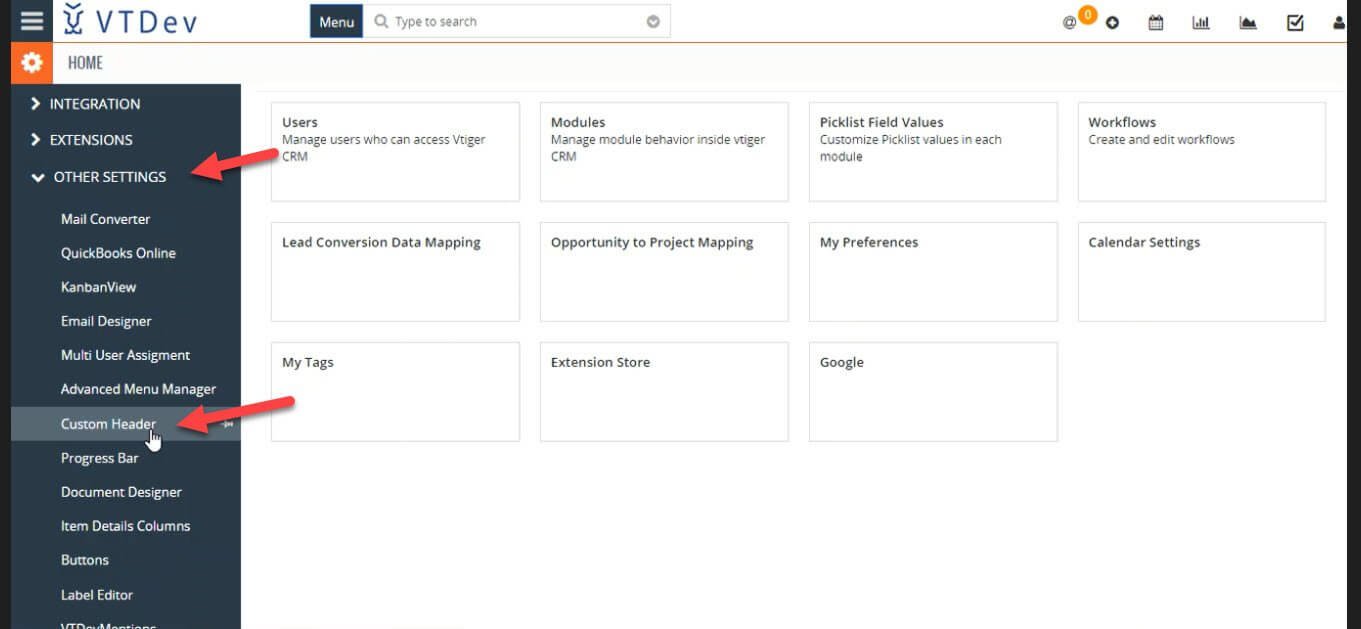
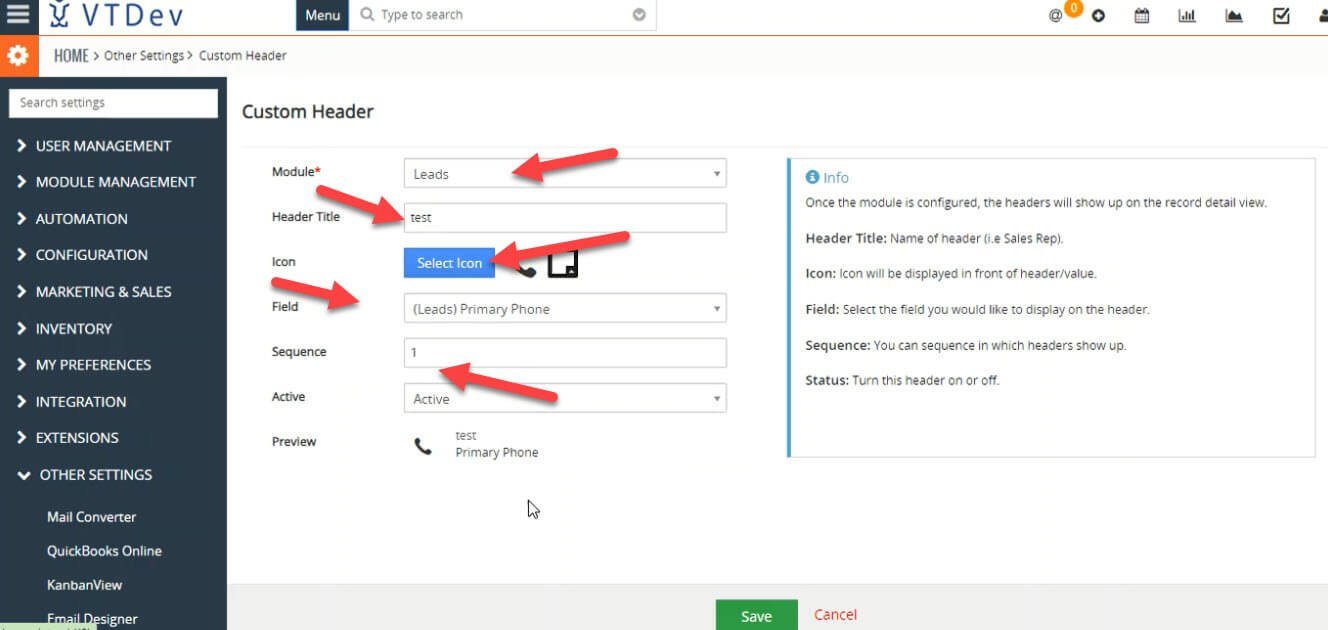
Every VTDev extension includes clear documentation to help you get started quickly. From installation and configuration to customization and troubleshooting, our step-by-step guides make it easy to deploy the extension and maximize its capabilities. If you need additional assistance, our team is always available to provide expert support.
We provide comprehensive documentation for every VTDev extension, covering installation, setup, configuration, permissions, customization, and best practices. Our guides are designed to help administrators and developers integrate the extension smoothly while ensuring optimal performance. Dedicated technical support is also available whenever you need assistance.
This structure fits well as a Documentation & Guide section beneath your extension details and maintains the same professional tone used throughout the VTDev website.
Custom Header extensions in Vtiger refer to adding additional headers or modifying existing ones. If you are looking for someone to help you configure the Custom Headers Extension with your Vtiger Feel free to contact VtigerDev. Because there is no Vtiger job that’s impossible for us.